A plumbing landing page will not get you found on Google. It converts people who already found you somewhere else: your Google Business Profile, a paid ad, the number on the side of your van, a neighbour's recommendation. That is a real job and most plumbers do it badly. But it is not the job the internet keeps promising you, and the gap between the two is where a lot of money gets wasted.
We can be specific about this, because we host the pages. 177 customer sites are live on a simplepages.ai subdomain, which puts them inside our own Search Console property, so we can see exactly how Google treats them. Over the six months to 24 August 2026, three of them picked up any Google impressions at all. Three. Not three per cent, three sites out of a hundred and seventy-seven. Publishing a page is not a distribution strategy, and any guide that implies otherwise is selling you something.
What actually happens to a new trade page in Google
Here is the part nobody publishes, because it is unflattering to everyone including us. These are the only three of those 177 sites that Google Search Console recorded a single impression for between 25 February and 24 August 2026. Another 134 customers run their pages on their own domains, which sit outside our property, so this is not everything we host. It is everything we can see, and the pattern in it is not subtle.
Every simplepages.ai customer site with any Google impressions, six months to 24 August 2026| Page | Impressions | Clicks | Avg. position |
|---|
| Events venue | 241 | 0 | 1.2 |
|---|
| Mobile tyre fitting | 218 | 0 | 90.1 |
|---|
| Phone leasing | 4 | 0 | 54.0 |
|---|
The tyre-fitting one is worth staring at. It ranks for the queries a trade business actually wants, the local ones with a job attached, and it sits at position 90. That is page nine. Nobody goes to page nine. There is nothing wrong with the page either: it is indexed, it targets the right terms, and it gets nothing, because a page does not win a competitive local query by itself.
The venue page is the interesting counter-example: position 1.2, and still zero clicks. It ranks because it is the only page on the internet about that specific venue. Ranking first for your own name is not distribution either. It just means Google can find you when someone already knows who you are.
The job the page actually does
Someone has water coming through a ceiling. They are standing up, holding a phone in one hand, and they got your name from somewhere about eight seconds ago. Before they give up and go back to the search results they need to know you will pick up, that you come out to their postcode, and that you are not going to be weird about being in their house at midnight.
Nothing else on the page is being read. Not the bit about the family business since 1998, not the row of accreditation logos. Someone standing in two inches of water is not browsing. The only thing worth measuring is whether the phone rang.
What a good one looks like
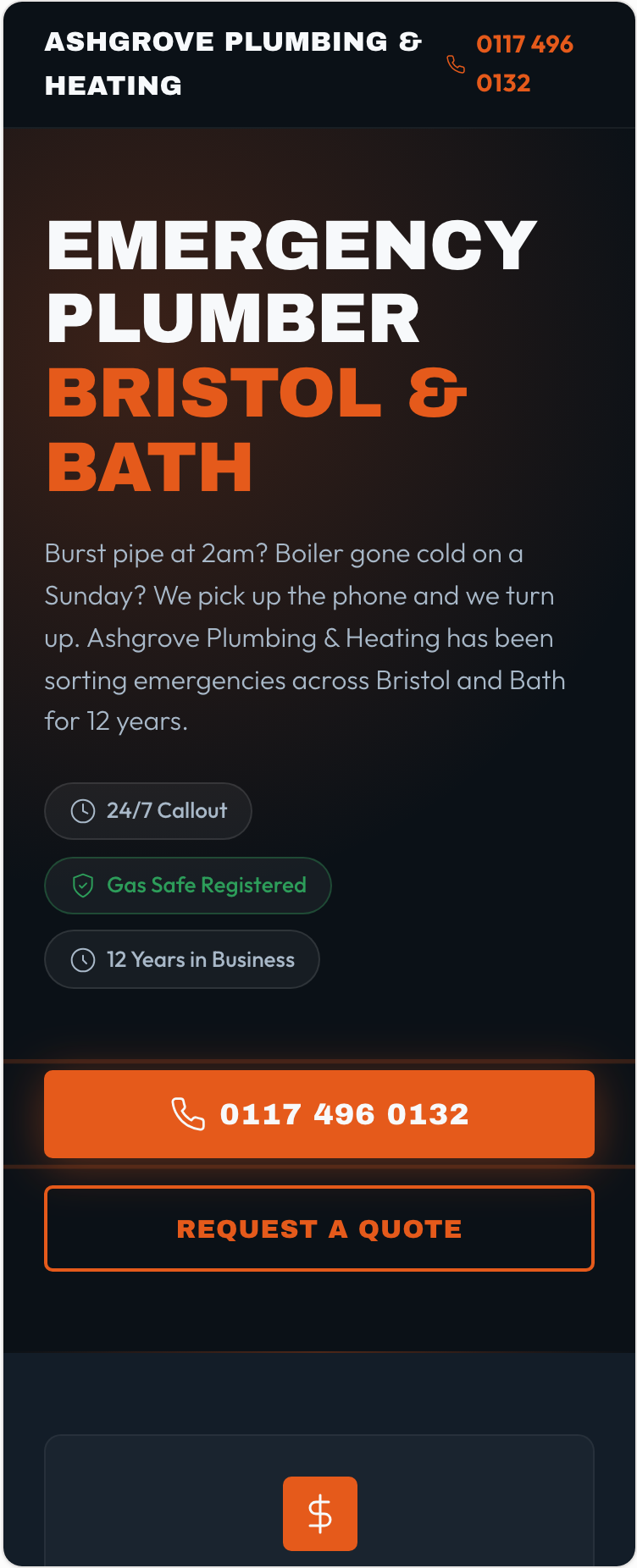
This is a page our generator produced from one prompt describing a Bristol emergency plumber. I have not tidied it up for the screenshot. Look at it the way the person with the wet ceiling would, at phone width, in a hurry.
The number is there twice before you scroll, once as text in the header and once as a button you could hit with your eyes shut. The headline says the trade and the two cities, which is what someone panicking scans for. Of the three badges, Gas Safe is the one carrying real weight, because it is the only plumbing credential in the UK with the law behind it. The quote form is there but pushed down, since it is for the boiler that died on Tuesday rather than the pipe that went on Sunday night.
- Name the trade and the place in the headline. Not "Quality plumbing solutions". Emergency plumber, Bristol and Bath.
- Make the number a real tel: link, not an image and not text someone has to select and copy.
- State the call-out fee, or an hourly range, or a promise about how fast you call back. Silence on price loses more calls than a high price does, because silence reads as "about to be expensive".
- Put the coverage area near the top. Half the hesitation before a call is not about you, it is the caller wondering whether you will even come out to them.
The jobs that actually pay
Emergency work is the loudest part of a plumbing business and usually the worst paid. An hour at 2am with a compression fitting is worth a fraction of a bathroom refit, and the person whose pipe burst will probably never call you again. The one costing up a new bathroom has been reading about it for a fortnight, is going to get two other quotes, and is worth four figures.
Those two people need different things from the same page, which is why the quote form is not just a fallback for people who dislike phoning. The 2am caller wants the button. The person pricing up a new bathroom in January wants to send you a message at 9pm and get a considered reply in the morning, and they will judge you on that reply. If your form collects a name and a number and nothing else, you have thrown away the context that lets you answer well.
Ask for the problem in the caller's own words. It costs one extra field, it is the difference between calling back with a price and calling back with questions, and it makes the enquiry sortable later. The lead-capture playbook covers what to ask for and what to leave out.
Where the caller actually comes from
This is why the tyre-fitting page sits at position 90 and always will. It is competing in the wrong arena. The blue links for "emergency plumber Bristol" are directories and franchise chains with a decade of backlinks. The map pack next to them is winnable this month by a one-van operation with forty good reviews.
So what does get you found
In rough order of return per hour spent, and none of this happens on your website:
- Claim and fill in your Google Business Profile. Right categories, real opening hours including the out-of-hours ones, your service area, photos of jobs you actually did. It is free and it will do more than anything else on this list.
- Ask every satisfied customer for a review, by text, the same day, while they are still relieved. Review count and recency move map-pack ranking more than anything you can do to a web page.
- Get your name, address and phone number identical everywhere it appears: Checkatrade, Yell, your Facebook page, your invoice footer.
- Then, once calls are arriving, make the page they land on convert. That is what the rest of this article is about, and it is fourth on the list for a reason.
There is more on the mechanics in our guide to local SEO for service businesses, and the general version of the page advice lives in the local service landing page guide.
When the page really is the bottleneck
If you are already paying for Google Ads, everything above inverts. Paid traffic turns up whether or not your Business Profile is any good, you are paying by the click, and a page that converts at four per cent instead of two halves what each job costs you to win. Same story with Facebook ads for boiler installs, or a QR code on the van. Once you are paying for the visit, the page is the thing standing between you and the job.
So the decision is which problem you actually have. If the phone is not ringing, close this tab and go and fill in your Business Profile. If the phone rings but the jobs are not converting, the page is worth an afternoon, and you can see which enquiries came from where in the leads inbox and conversion analytics rather than guessing. Two different problems, and the page only fixes one of them.